> ## Documentation Index
> Fetch the complete documentation index at: https://docs.getpostern.com/llms.txt
> Use this file to discover all available pages before exploring further.
# Connect Plaid
> One trip through Plaid's own window links one bank, and each bank becomes its own read-only connection. Plaid bills per bank, so use Plaid for the banks SimpleFIN cannot reach.
**Before you start**
* **A free Plaid developer account** at [dashboard.plaid.com](https://dashboard.plaid.com).
Postern includes no Plaid access of its own.
* **Money, per linked bank.** On Production, Plaid bills Transactions monthly for every bank you
keep linked. It bills Balance per request. Plaid publishes no price list. A new US or Canada
team lands on the free Trial plan instead. Trial gives real bank data, up to 10 linked banks,
and no security questionnaire.
* **Postern up, and the Console open.** Open `http://localhost:8787` in a browser on the machine
Postern runs on. Only this computer can reach these addresses. Nothing on your Wi-Fi, and
nothing on the internet, can. If that machine has no screen,
[set up remote access](/start/remote-access) first.
* **SimpleFIN first.** One SimpleFIN subscription covers every bank it reaches. Plaid bills per
bank. Use Plaid for the banks SimpleFIN cannot reach — [Connect SimpleFIN](/connect/simplefin).
* **Item and Link are Plaid's words.** An Item is one bank connection at Plaid. Link is Plaid's
connect-your-bank window.
This page documents Production, and Production is what the Console saves. The Plaid card says so
itself: `Console defaults to Production.` Plaid's Sandbox links a fake bank, not yours —
[it is for testing only](#sandbox-is-for-testing-only).
Every Plaid screen quoted below comes from one recorded run, on 29–30 July 2026. That run was on
Sandbox, so each Plaid screen in it carries a grey bar that reads
`You are currently in Sandbox mode.` Plaid's own screens are the same either way. Only your bank's
sign-in differs, and this page names no control on it. Trust your screen over this page.
## Choose your path
| If… | Then |
| ------------------------------------------------ | ----------------------------------------------------------------------------------------------------------------------------- |
| You have not saved a Plaid app here yet | Start at [Create your Plaid developer account](#plaid-account). |
| Your app is saved and you want another bank | Open **Sources**, find the **Plaid** group, press **Add a bank**, then go to [Get past Plaid's phone screen](#link-the-bank). |
| A bank's **Cadence** cell reads `consent lapsed` | [Reconnect a bank when its consent lapses](#reconnect). |
Trial counts 10 banks for the lifetime of the team. A bank you remove does not give the slot back.
Plaid states it: *"Removing Items created on a Trial plan (using /item/remove) will not allow you
to create more Items."*
A bank you already linked at `my.plaid.com` does not carry over to Postern. Postern reads only
the banks you link through its own Plaid Link session. Linking such a bank again here spends
another Trial slot.
Open [dashboard.plaid.com](https://dashboard.plaid.com) and create an account.
Plaid's Trial plan covers US and Canada teams created on or after 2026-04-15. An older team uses
paid Production access instead. Which plan you hold decides what this page costs you.
The Console tells you where to go. Open **Sources**, press **Add a source**, then press **Plaid**.
The card's left column is headed **Register your app**, which the screen prints in capitals. It
carries 3 numbered lines:
1. `Sign in at dashboard.plaid.com → Team Settings → Keys.`
2. `Copy your client_id and the Production secret.`
3. `Request Production access if you haven’t — Plaid approves it.`
The card's first line is out of date. Plaid's dashboard has no Team Settings item. Follow this
page instead, and expect the card to be corrected.
In Plaid's dashboard, the left rail groups its items. Under **PLATFORM**, open **Developers** and
select **Keys**. The address is
[dashboard.plaid.com/developers/keys](https://dashboard.plaid.com/developers/keys), which you can
also open directly.
The page is headed **Keys** and carries 3 cards, one under the next:
| card | what it holds |
| --------------------- | ----------------------------------------------------------------------------------------- |
| **Client ID** | Readable on the page. One copy control beside it. |
| **Production secret** | Hidden behind dots. A control reveals it, a second copies it, and **Rotate** replaces it. |
| **Sandbox secret** | The same 3 controls, over a different value. |
Copy the **Client ID**. Then copy the **Production secret** — the second card, not the third.
Both secrets sit on this one page, a card apart, and they look identical once revealed. This is the
step where the wrong one gets copied. A Sandbox secret is not refused loudly: Postern saves it,
Plaid's production host rejects the call, and no bank ever links.
The Client ID is the same string in every Plaid environment. Each environment has its own secret.
Postern saves what you paste here as a Production app, and the card's own note says so:
`Console defaults to Production.`
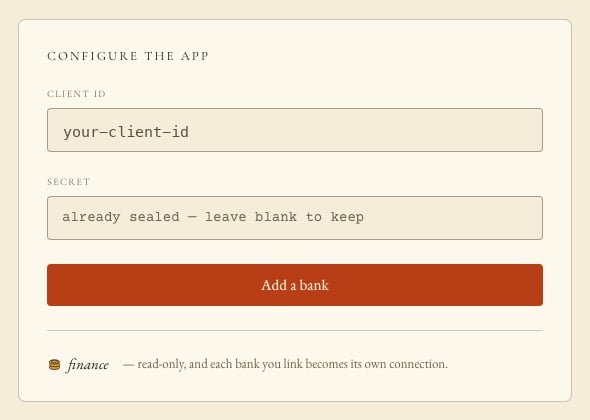
Postern encrypts the secret and stores it on your own machine as you save. The Console never shows
it again: the field afterwards reads `already sealed — leave blank to keep`. Plaid's dashboard is
the only other place you can read it.
The card's right-hand panel is headed **Configure the app**, again in capitals on screen. It carries
**Client ID**, **Secret**, and the button that opens Plaid Link.
Paste the `client_id` into **Client ID**. Paste the Production secret into **Secret**.
Press **Save & add a bank**.
That button reads **Save & add a bank** until you save an app.
After you save one it reads **Add a bank**, and **Secret** reads
`already sealed — leave blank to keep`. Leave **Secret** blank to keep the stored secret.
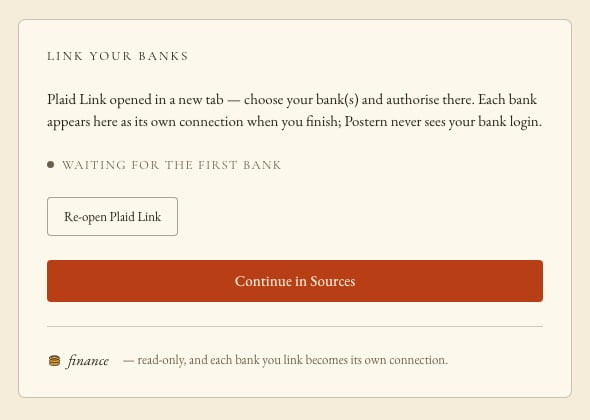
Postern opens Plaid Link in a new browser tab. The Console panel switches to **Link your banks** and
reads `waiting for the first bank`.
 If no new tab opened, a pop-up blocker stopped it. Press **Re-open Plaid Link** on the panel behind
it. It opens the same address.
That address works for 3 hours. After that, press **Add a bank** again.
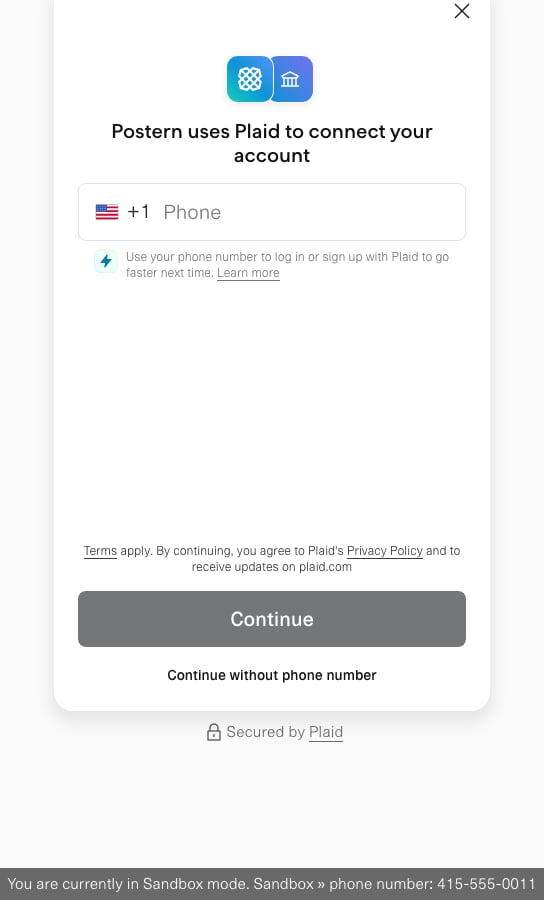
The new tab carries the title `Connect with Plaid`. Its first screen reads `Postern uses Plaid to
connect your account`. Every Postern user sees that heading, because Postern sends the name.
Plaid asks for a phone number first. You do not need one.
Press **Continue without phone number**. It sits directly under the **Continue** button.
Type a number instead and Plaid may refuse it, even a working mobile. The screen then reads
`Invalid phone number` over `We couldn't verify that … is a valid number.` Press **Try again**,
then press **Continue without phone number**.
If no new tab opened, a pop-up blocker stopped it. Press **Re-open Plaid Link** on the panel behind
it. It opens the same address.
That address works for 3 hours. After that, press **Add a bank** again.
The new tab carries the title `Connect with Plaid`. Its first screen reads `Postern uses Plaid to
connect your account`. Every Postern user sees that heading, because Postern sends the name.
Plaid asks for a phone number first. You do not need one.
Press **Continue without phone number**. It sits directly under the **Continue** button.
Type a number instead and Plaid may refuse it, even a working mobile. The screen then reads
`Invalid phone number` over `We couldn't verify that … is a valid number.` Press **Try again**,
then press **Continue without phone number**.
 Plaid then shows `Select your institution`: a search field placeholdered `Search`, over a grid of
bank tiles. Press your bank's tile. The recorded run pressed `CHASE`.
Postern sends the United States as the only country, so the grid offers US banks.
Plaid may also show a banner that names your app and says it `is testing something new`. Plaid
builds that line from the name Postern sends. It appears for an app without full Production access,
and nothing in the Console turns it off.
A bank can also need time at Plaid before it works with a new app. Minutes to hours is usual.
Charles Schwab has taken up to about 6 weeks.
Plaid hands you to your bank. The handoff screen carries your bank's name. In the recorded run it
read `Log into Chase`, over `After logging into Chase, make sure you check all these boxes:`.
That screen shows one ticked box: `Share all accounts to see all your financial info with
Postern`. Plaid's own instruction is to check all the boxes it shows you. Do that at your bank
before you finish.
Press **Continue to login ⧉**. Your bank's own sign-in page opens.
Sign in there with your bank's own credentials. You never paste a bank password into Postern. Only a
token for that one bank comes back.
[Nothing outside your home has to reach your machine for this to work.](/reference/provider-sign-ins#plaid-never-shows-postern-your-bank-sign-in)
Your bank then asks which accounts to share. Tick every account you want an agent to read, and
approve. Your bank names its own screens and its own controls, so this page names none of them.
Whatever your bank offers to share, finance stays read-only. No agent can move money.
Plaid takes you back and ends on a success page. The captures of that run hold 2 wordings for it:
* `Success` over `Your account has been successfully linked to Postern`
* `Success!` over `Your information has been successfully shared. It's safe to close the browser now.`
Plaid may then offer to save the bank to your own Plaid profile. That screen carries your bank's
name — `Save Chase with Plaid` in the recorded run — over `Connect faster to 8,000+ Plaid-powered
apps`. Press **Finish without saving** to skip it. That offer is Plaid's, not Postern's.
Close the Plaid tab and go back to the Console tab.
Leave the **Link your banks** panel open. It checks every few seconds, and reads
`waiting for the first bank` until something lands.
When you finish at Plaid, the bank appears on that panel with the status `ok`. The button changes
from **Continue in Sources** to **Done — go to Sources**. Press it.
**Sources** now carries a **Plaid** group. Its row reads `byo app · finance` and
`feeds 1 bank · every 6h, all of them`, with **Add a bank** and **Edit app** beside it. Your bank
sits beneath it as its own row.
Plaid then shows `Select your institution`: a search field placeholdered `Search`, over a grid of
bank tiles. Press your bank's tile. The recorded run pressed `CHASE`.
Postern sends the United States as the only country, so the grid offers US banks.
Plaid may also show a banner that names your app and says it `is testing something new`. Plaid
builds that line from the name Postern sends. It appears for an app without full Production access,
and nothing in the Console turns it off.
A bank can also need time at Plaid before it works with a new app. Minutes to hours is usual.
Charles Schwab has taken up to about 6 weeks.
Plaid hands you to your bank. The handoff screen carries your bank's name. In the recorded run it
read `Log into Chase`, over `After logging into Chase, make sure you check all these boxes:`.
That screen shows one ticked box: `Share all accounts to see all your financial info with
Postern`. Plaid's own instruction is to check all the boxes it shows you. Do that at your bank
before you finish.
Press **Continue to login ⧉**. Your bank's own sign-in page opens.
Sign in there with your bank's own credentials. You never paste a bank password into Postern. Only a
token for that one bank comes back.
[Nothing outside your home has to reach your machine for this to work.](/reference/provider-sign-ins#plaid-never-shows-postern-your-bank-sign-in)
Your bank then asks which accounts to share. Tick every account you want an agent to read, and
approve. Your bank names its own screens and its own controls, so this page names none of them.
Whatever your bank offers to share, finance stays read-only. No agent can move money.
Plaid takes you back and ends on a success page. The captures of that run hold 2 wordings for it:
* `Success` over `Your account has been successfully linked to Postern`
* `Success!` over `Your information has been successfully shared. It's safe to close the browser now.`
Plaid may then offer to save the bank to your own Plaid profile. That screen carries your bank's
name — `Save Chase with Plaid` in the recorded run — over `Connect faster to 8,000+ Plaid-powered
apps`. Press **Finish without saving** to skip it. That offer is Plaid's, not Postern's.
Close the Plaid tab and go back to the Console tab.
Leave the **Link your banks** panel open. It checks every few seconds, and reads
`waiting for the first bank` until something lands.
When you finish at Plaid, the bank appears on that panel with the status `ok`. The button changes
from **Continue in Sources** to **Done — go to Sources**. Press it.
**Sources** now carries a **Plaid** group. Its row reads `byo app · finance` and
`feeds 1 bank · every 6h, all of them`, with **Add a bank** and **Edit app** beside it. Your bank
sits beneath it as its own row.
 A bank that has not synced yet reads `0 accounts` under **Coverage**, and `never` under
**Last heard**. The **Finance** sector reads `Awaiting first sync`. That is normal.
Press **Sync now**, or wait.
Postern checks every Plaid bank at the same rate: every 6 hours, and never faster than 15 minutes.
A bank's own page shows that rate under **Poll cadence**, read-only. Beside it sit `— set once, for
all Plaid banks` and a link **Change it on the Plaid group →**. That link lands on **Sources**, which
carries no cadence control for Plaid. You cannot change the rate from the Console today.
One trip through Plaid Link links one bank. The panel says `bank(s)` because that is Plaid's
wording.
[A multi-bank trip needs a Plaid user token Postern cannot get.](/reference/provider-sign-ins#plaid-never-shows-postern-your-bank-sign-in)
For the next bank, open **Sources**, find the **Plaid** group header, and press **Add a bank**.
**Client ID** is already filled and the secret stays stored, so leave **Secret** blank.
Close Plaid's tab before you finish and nothing links. The panel still reads `waiting for the first
bank`, its button changes to **Done — go to Sources**, and no bank row appears. You linked nothing
and spent no slot. Press **Add a bank** and start again.
Bank consent expires about once a year, per bank. Capital One, Fidelity and Bank of America all
enforce it. A lapsed bank returns empty pages, which reads like a quiet week. Postern checks each
bank's standing and shows it instead.
In **Sources**, a lapsed bank's **Cadence** cell reads `consent lapsed`. Its last cell reads
**Reconnect →** rather than **Manage →**. Press **Reconnect →**.
On the connection page, press **Reconnect at Plaid**. Postern opens Plaid's re-approval page in a
new tab and says `Opened Plaid's re-approval page in a new tab.` Sign in at your bank there and
approve.
That re-approval address works for about 30 minutes, not 3 hours. This screen carries no re-open
button. If a pop-up blocker eats the tab, press **Reconnect at Plaid** again.
The re-approval runs against the same Item. No re-paste, no fresh trip through Plaid Link. The Item
keeps its identity,
carries on from where it stopped, and fills in what it missed. The row clears at the next check, up
to 6 hours away. **Sync now**, on the same page, checks at once.
Re-approval cannot fix these 2 cases.
Plaid no longer holds that bank's Item. Link the bank again: open **Sources**, then press
**Add a bank** on the **Plaid** group. On a Trial team that costs a slot.
Or your Plaid team hit its bank cap, or spent its credits. No re-link can work. Free a slot or
change your Plaid plan first.
A connection you disconnected has no credential left on your machine, and the Console says so
rather than offer a reconnect that cannot work.
## Sandbox is for testing only
Plaid's Sandbox links Plaid's own fake bank, not yours. **It is not the setup path.** Use it only if
you are testing Postern on a machine with no bank to link. For real use, go back to
[Copy your client ID and Production secret](#keys).
It does complete — the recorded run of 29–30 July 2026 walked it end to end and left a bank row in
the Console.
The Console has no environment picker. **Save & add a bank** saves your app as Production whatever
secret you type — the card's own note reads `Console defaults to Production.` So save the Sandbox app
past the Console, then use the Console's own button.
The command below writes over any Plaid app already saved here. Every bank that uses that app stops
until you save an app again.
Run this on the machine Postern runs on:
```bash theme={"system"}
curl -s -X POST http://localhost:8787/api/plaid/app \
-H 'content-type: application/json' \
-d '{"clientId":"YOUR_PLAID_CLIENT_ID","clientSecret":"YOUR_PLAID_SANDBOX_SECRET","env":"sandbox"}'
```
It answers `{"configured":true,"clientId":"YOUR_PLAID_CLIENT_ID","env":"sandbox"}`.
Now open **Sources**, press **Add a source**, then press **Plaid**. Leave **Secret** blank. Press
**Add a bank**. That button reuses the saved app and leaves its environment alone, so Plaid Link
opens on Sandbox. Every Plaid screen then carries the grey bar `You are currently in Sandbox mode.`
Walk it as [Get past Plaid's phone screen](#link-the-bank) describes. 3 things belong to Plaid's test
harness rather than to setup:
* The grey bar names the only number Plaid accepts here:
`You are currently in Sandbox mode. Sandbox » phone number: 415-555-0011`. You still do not need
one — **Continue without phone number** works.
* Press any bank tile. Sandbox sends you to its own test bank, `First Platypus Bank`, whichever tile
you pressed. Below that bank's sign-in form sits a strip with an `Error Selector` and a
`Submit Error` control, for forcing failures on purpose.
* The test bank takes any sign-in. The recorded run typed a username of its own. Plaid's published
test login is `user_good` / `pass_good`, and its published MFA code is `1234`. Its account picker
lists several invented accounts, `Plaid Checking ··· ··· 0000` among them. None is a real account.
It ends at `Success`, over `Your account has been successfully linked to Postern`.
`.env` is the other way in, and it dead-ends. Set `PLAID_CLIENT_ID`, `PLAID_SECRET` and
`PLAID_ENV=sandbox` in `.env`, beside `docker-compose.yml`, then run `docker compose up -d` again.
Postern reads those 3 variables only until you save a Plaid app. The Console cannot drive them: its
Plaid screen still reads `not configured`, and its only button saves a Production app, which
overwrites them. Use the command above instead.
To go back to Production, open **Settings**, find **Provider apps**, and press **Clear** on the
**Plaid** row. Then paste your Production keys at **Sources** → **Add a source** → **Plaid**. No bank
that used the old app refreshes again until you save one.
## Confirm it works
* **Sources** carries a **Plaid** group with one row per linked bank. The group's own line says how
many banks feed it.
* Each bank's **Cadence** cell reads a time, not `consent lapsed`.
* Open **Settings** and find **Provider apps**: **Plaid** reads `configured`.
* After the first sync, a bank's **Coverage** reads more than `0 accounts`, and its **Last heard**
reads a time rather than `never`.
* A bank that also arrives through SimpleFIN carries `also arrives via SimpleFIN — served as one`.
Postern merges 2 rows on its own only when both providers publish the last 4 digits. Otherwise it
asks `Is this the same account, seen twice?` on its own screen. Answer **They’re the same account**
or **Keep them separate**, and it stays answered.
* Ask an agent with a **finance** grant: *which finance sources can you see, and how fresh are they?*
It names the Plaid bank and its standing. It names the consent expiry date too, once Plaid
publishes one. You grant **finance** at **Agents & keys** —
[Connect an agent](/start/connect-an-agent).
## If something went wrong
| What you see | What to do |
| ------------------------------------------------------------------------------------------ | --------------------------------------------------------------------------------------------------------------------------------------------------------------------------------------------------------------------- |
| `Invalid phone number` over `We couldn't verify that … is a valid number.` | Plaid refused the number, and a working mobile can hit this. Press **Try again**, then press **Continue without phone number** — [Get past Plaid's phone screen](#link-the-bank). |
| No new tab opened after you pressed **Add a bank** | A pop-up blocker stopped it. Press **Re-open Plaid Link** on the **Link your banks** panel — [Save your app and open Plaid Link](#configure). |
| No Plaid Link tab opens, and the secret you saved was a Sandbox one | The Console saves every app as Production, so a Sandbox secret reaches Plaid's production host. Paste the Production secret into **Secret** — [Copy your client ID and Production secret](#keys). |
| The bank row reads `0 accounts` and `never` | Nothing has synced yet. Press **Manage →** on that row, then **Sync now** — [Watch the bank land in the Console](#first-bank). |
| **Reconnect at Plaid** does not bring a bank back | Plaid no longer holds that Item, or your Plaid team hit its bank cap or spent its credits. Link the bank again with **Add a bank**, or free a slot at Plaid — [Reconnect a bank when its consent lapses](#reconnect). |
| No bank refreshes any more after you pressed **Clear** in **Settings** → **Provider apps** | Postern no longer holds that app. Paste the `client_id` and the Production secret again — [Save your app and open Plaid Link](#configure). |
| The Console's Plaid screen reads `not configured` after you set the `PLAID_` variables | Environment variables never make that screen ready. Paste your keys at **Sources** → **Add a source** → **Plaid** instead — [Copy your client ID and Production secret](#keys). |
| `http://localhost:8787` does not open | Postern runs on another machine. [Set up remote access](/start/remote-access), then return to [Save your app and open Plaid Link](#configure). |
## What you have now
One connection for each bank you linked. Finance is read-only and carries no actions. No agent can
move money, and Postern never held the bank sign-in.
[Only Home Assistant carries actions today.](/reference/grants-and-sectors#which-sectors-an-agent-can-act-in)
Postern caches accounts, transactions and holdings on your own machine. An agent with a **finance**
grant answers from that cache. Where a bank also arrives through SimpleFIN, agents get one merged
row, and both provider rows stay readable.
[Plaid fixes the 2-year history window when you link the bank, and only a fresh trip through Plaid
Link widens it.](/reference/mcp-reading#four-properties-of-finance-data)
What this costs you from here:
* Plaid bills Production per linked bank, monthly, for as long as the bank stays linked.
* A balance an agent reads from the cache costs nothing. An explicit live balance costs money each
time: it goes to a Plaid endpoint Plaid bills per call.
* Consent expires about once a year, per bank. Postern shows the lapse but cannot renew it —
[Reconnect a bank when its consent lapses](#reconnect).
* Disconnect a bank and Postern tells Plaid to cancel that Item. That also stops Plaid's charge for
it, and Postern leaves your other Plaid banks alone. It is one-way: you cannot reconnect a bank you
disconnected or erased, only link it from the start, on a fresh slot.
## Next
an agent key, shown once · a few minutes, plus a restart of the client · you choose its sectors
when you create it
Health Auto Export on your iPhone · about 10 minutes · push, not pull
your own Google Cloud app + one app password · about 20 minutes · weekly re-consent until you
publish to production
A bank that has not synced yet reads `0 accounts` under **Coverage**, and `never` under
**Last heard**. The **Finance** sector reads `Awaiting first sync`. That is normal.
Press **Sync now**, or wait.
Postern checks every Plaid bank at the same rate: every 6 hours, and never faster than 15 minutes.
A bank's own page shows that rate under **Poll cadence**, read-only. Beside it sit `— set once, for
all Plaid banks` and a link **Change it on the Plaid group →**. That link lands on **Sources**, which
carries no cadence control for Plaid. You cannot change the rate from the Console today.
One trip through Plaid Link links one bank. The panel says `bank(s)` because that is Plaid's
wording.
[A multi-bank trip needs a Plaid user token Postern cannot get.](/reference/provider-sign-ins#plaid-never-shows-postern-your-bank-sign-in)
For the next bank, open **Sources**, find the **Plaid** group header, and press **Add a bank**.
**Client ID** is already filled and the secret stays stored, so leave **Secret** blank.
Close Plaid's tab before you finish and nothing links. The panel still reads `waiting for the first
bank`, its button changes to **Done — go to Sources**, and no bank row appears. You linked nothing
and spent no slot. Press **Add a bank** and start again.
Bank consent expires about once a year, per bank. Capital One, Fidelity and Bank of America all
enforce it. A lapsed bank returns empty pages, which reads like a quiet week. Postern checks each
bank's standing and shows it instead.
In **Sources**, a lapsed bank's **Cadence** cell reads `consent lapsed`. Its last cell reads
**Reconnect →** rather than **Manage →**. Press **Reconnect →**.
On the connection page, press **Reconnect at Plaid**. Postern opens Plaid's re-approval page in a
new tab and says `Opened Plaid's re-approval page in a new tab.` Sign in at your bank there and
approve.
That re-approval address works for about 30 minutes, not 3 hours. This screen carries no re-open
button. If a pop-up blocker eats the tab, press **Reconnect at Plaid** again.
The re-approval runs against the same Item. No re-paste, no fresh trip through Plaid Link. The Item
keeps its identity,
carries on from where it stopped, and fills in what it missed. The row clears at the next check, up
to 6 hours away. **Sync now**, on the same page, checks at once.
Re-approval cannot fix these 2 cases.
Plaid no longer holds that bank's Item. Link the bank again: open **Sources**, then press
**Add a bank** on the **Plaid** group. On a Trial team that costs a slot.
Or your Plaid team hit its bank cap, or spent its credits. No re-link can work. Free a slot or
change your Plaid plan first.
A connection you disconnected has no credential left on your machine, and the Console says so
rather than offer a reconnect that cannot work.
## Sandbox is for testing only
Plaid's Sandbox links Plaid's own fake bank, not yours. **It is not the setup path.** Use it only if
you are testing Postern on a machine with no bank to link. For real use, go back to
[Copy your client ID and Production secret](#keys).
It does complete — the recorded run of 29–30 July 2026 walked it end to end and left a bank row in
the Console.
The Console has no environment picker. **Save & add a bank** saves your app as Production whatever
secret you type — the card's own note reads `Console defaults to Production.` So save the Sandbox app
past the Console, then use the Console's own button.
The command below writes over any Plaid app already saved here. Every bank that uses that app stops
until you save an app again.
Run this on the machine Postern runs on:
```bash theme={"system"}
curl -s -X POST http://localhost:8787/api/plaid/app \
-H 'content-type: application/json' \
-d '{"clientId":"YOUR_PLAID_CLIENT_ID","clientSecret":"YOUR_PLAID_SANDBOX_SECRET","env":"sandbox"}'
```
It answers `{"configured":true,"clientId":"YOUR_PLAID_CLIENT_ID","env":"sandbox"}`.
Now open **Sources**, press **Add a source**, then press **Plaid**. Leave **Secret** blank. Press
**Add a bank**. That button reuses the saved app and leaves its environment alone, so Plaid Link
opens on Sandbox. Every Plaid screen then carries the grey bar `You are currently in Sandbox mode.`
Walk it as [Get past Plaid's phone screen](#link-the-bank) describes. 3 things belong to Plaid's test
harness rather than to setup:
* The grey bar names the only number Plaid accepts here:
`You are currently in Sandbox mode. Sandbox » phone number: 415-555-0011`. You still do not need
one — **Continue without phone number** works.
* Press any bank tile. Sandbox sends you to its own test bank, `First Platypus Bank`, whichever tile
you pressed. Below that bank's sign-in form sits a strip with an `Error Selector` and a
`Submit Error` control, for forcing failures on purpose.
* The test bank takes any sign-in. The recorded run typed a username of its own. Plaid's published
test login is `user_good` / `pass_good`, and its published MFA code is `1234`. Its account picker
lists several invented accounts, `Plaid Checking ··· ··· 0000` among them. None is a real account.
It ends at `Success`, over `Your account has been successfully linked to Postern`.
`.env` is the other way in, and it dead-ends. Set `PLAID_CLIENT_ID`, `PLAID_SECRET` and
`PLAID_ENV=sandbox` in `.env`, beside `docker-compose.yml`, then run `docker compose up -d` again.
Postern reads those 3 variables only until you save a Plaid app. The Console cannot drive them: its
Plaid screen still reads `not configured`, and its only button saves a Production app, which
overwrites them. Use the command above instead.
To go back to Production, open **Settings**, find **Provider apps**, and press **Clear** on the
**Plaid** row. Then paste your Production keys at **Sources** → **Add a source** → **Plaid**. No bank
that used the old app refreshes again until you save one.
## Confirm it works
* **Sources** carries a **Plaid** group with one row per linked bank. The group's own line says how
many banks feed it.
* Each bank's **Cadence** cell reads a time, not `consent lapsed`.
* Open **Settings** and find **Provider apps**: **Plaid** reads `configured`.
* After the first sync, a bank's **Coverage** reads more than `0 accounts`, and its **Last heard**
reads a time rather than `never`.
* A bank that also arrives through SimpleFIN carries `also arrives via SimpleFIN — served as one`.
Postern merges 2 rows on its own only when both providers publish the last 4 digits. Otherwise it
asks `Is this the same account, seen twice?` on its own screen. Answer **They’re the same account**
or **Keep them separate**, and it stays answered.
* Ask an agent with a **finance** grant: *which finance sources can you see, and how fresh are they?*
It names the Plaid bank and its standing. It names the consent expiry date too, once Plaid
publishes one. You grant **finance** at **Agents & keys** —
[Connect an agent](/start/connect-an-agent).
## If something went wrong
| What you see | What to do |
| ------------------------------------------------------------------------------------------ | --------------------------------------------------------------------------------------------------------------------------------------------------------------------------------------------------------------------- |
| `Invalid phone number` over `We couldn't verify that … is a valid number.` | Plaid refused the number, and a working mobile can hit this. Press **Try again**, then press **Continue without phone number** — [Get past Plaid's phone screen](#link-the-bank). |
| No new tab opened after you pressed **Add a bank** | A pop-up blocker stopped it. Press **Re-open Plaid Link** on the **Link your banks** panel — [Save your app and open Plaid Link](#configure). |
| No Plaid Link tab opens, and the secret you saved was a Sandbox one | The Console saves every app as Production, so a Sandbox secret reaches Plaid's production host. Paste the Production secret into **Secret** — [Copy your client ID and Production secret](#keys). |
| The bank row reads `0 accounts` and `never` | Nothing has synced yet. Press **Manage →** on that row, then **Sync now** — [Watch the bank land in the Console](#first-bank). |
| **Reconnect at Plaid** does not bring a bank back | Plaid no longer holds that Item, or your Plaid team hit its bank cap or spent its credits. Link the bank again with **Add a bank**, or free a slot at Plaid — [Reconnect a bank when its consent lapses](#reconnect). |
| No bank refreshes any more after you pressed **Clear** in **Settings** → **Provider apps** | Postern no longer holds that app. Paste the `client_id` and the Production secret again — [Save your app and open Plaid Link](#configure). |
| The Console's Plaid screen reads `not configured` after you set the `PLAID_` variables | Environment variables never make that screen ready. Paste your keys at **Sources** → **Add a source** → **Plaid** instead — [Copy your client ID and Production secret](#keys). |
| `http://localhost:8787` does not open | Postern runs on another machine. [Set up remote access](/start/remote-access), then return to [Save your app and open Plaid Link](#configure). |
## What you have now
One connection for each bank you linked. Finance is read-only and carries no actions. No agent can
move money, and Postern never held the bank sign-in.
[Only Home Assistant carries actions today.](/reference/grants-and-sectors#which-sectors-an-agent-can-act-in)
Postern caches accounts, transactions and holdings on your own machine. An agent with a **finance**
grant answers from that cache. Where a bank also arrives through SimpleFIN, agents get one merged
row, and both provider rows stay readable.
[Plaid fixes the 2-year history window when you link the bank, and only a fresh trip through Plaid
Link widens it.](/reference/mcp-reading#four-properties-of-finance-data)
What this costs you from here:
* Plaid bills Production per linked bank, monthly, for as long as the bank stays linked.
* A balance an agent reads from the cache costs nothing. An explicit live balance costs money each
time: it goes to a Plaid endpoint Plaid bills per call.
* Consent expires about once a year, per bank. Postern shows the lapse but cannot renew it —
[Reconnect a bank when its consent lapses](#reconnect).
* Disconnect a bank and Postern tells Plaid to cancel that Item. That also stops Plaid's charge for
it, and Postern leaves your other Plaid banks alone. It is one-way: you cannot reconnect a bank you
disconnected or erased, only link it from the start, on a fresh slot.
## Next
an agent key, shown once · a few minutes, plus a restart of the client · you choose its sectors
when you create it
Health Auto Export on your iPhone · about 10 minutes · push, not pull
your own Google Cloud app + one app password · about 20 minutes · weekly re-consent until you
publish to production